
Service Definition
Authentication:
OAuth 2.0
Read access
Status Code:
- 200 OK: Successful GET request.
- 201 Created: Successful creation of a resource.
- 400 Bad Request: Invalid request (e.g., missing parameters).
- 401 Unauthorized: Missing or incorrect authentication.
- 404 Not Found: Resource not found.
- 500 Internal Server Error: General server error.
Version 1:
AddressService:
/v1/Address/{id}:
Description: Retrieves an address based on the provided customerId
API URL: /{version}/Address/{id}
id: Represents the customerId as seen in the GUI. ATTENTION! Due to an offset configured in the database, the id in the response can may differ from the customerId
Json response structure:
{
  "id": 0,
  "lastname": "string",
  "firstname": "string",
  "communications": [
    {
      "address": "string",
      "communicationMediumId": 0
    }
  ],
  "company": "string",
  "function": "string",
  "addressType": "string",
  "street": "string",
  "city": "string",
  "zip": "string",
  "country": "string",
  "lastUpdate": "2024-12-11T07:26:36.434Z",
  "adressZusatz": "string",
  "kundeSeit": "2024-12-11T07:26:36.434Z",
  "sprachId": 0,
  "nrUndName": "string",
  "ganzeAdresse": "string"
}
The attributes map to the following text fields (see screenshot):
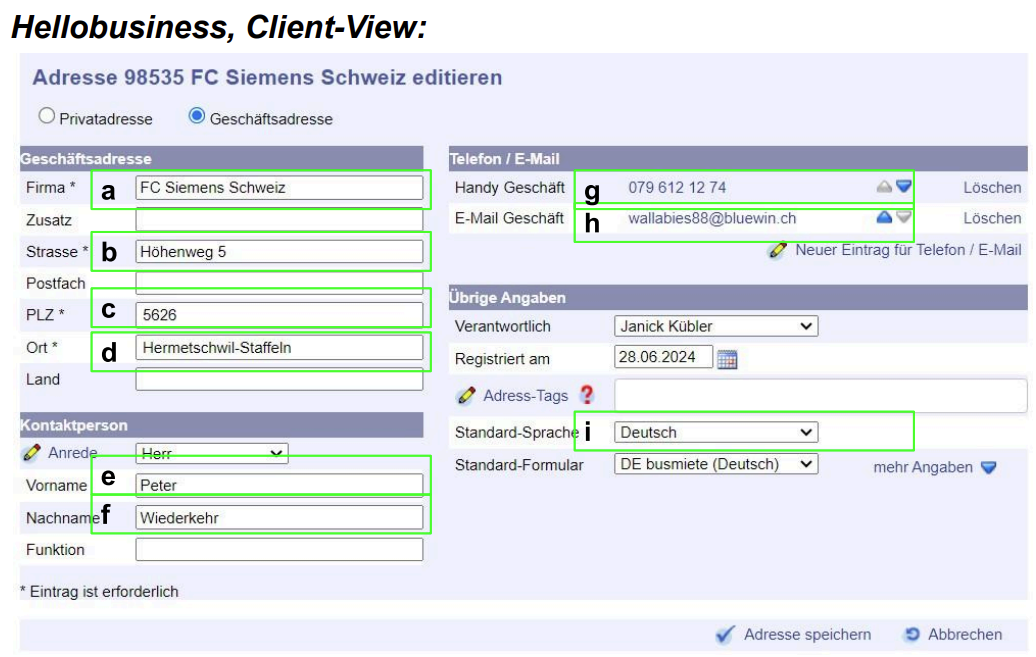
a = "company"
b = "street"
c = "zip"
d = "city"
e = "firstname"
f = "lastname"
g = "communications"."address" = like phone number or e-mail address
h "communications"."communicationMediumId" = type of communication medium e.g privat phone number or business e-mail address
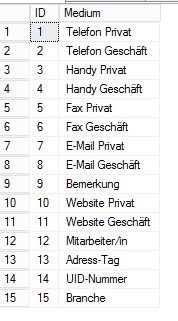
i <= "sprachId"
0 = nicht definiert (undefined)
1 = Deutsch (German)
2 = Englisch (English)
3 = Français (French)
4 = Italiano (Italian)
5 = Español (Spanish)
/v1/Address/ByCompany:
Description: Retrieves all addresses matching a CompanyName or a combination of street and zip.
API URL: /{version}/Address/ByCompany´?companyName={companyName}&street={street}&zip={zip}
Required attribute:
- companyName: The name of the company.
Optional attribute:
- street: Street name
- zip: ZIP code
Json response structure: (same as /v1/Address/{id}):
{
  "id": 0,
  "lastname": "string",
  "firstname": "string",
  "communications": [
    {
      "address": "string",
      "communicationMediumId": 0
    }
  ],
  "company": "string",
  "function": "string",
  "addressType": "string",
  "street": "string",
  "city": "string",
  "zip": "string",
  "country": "string",
  "lastUpdate": "2024-12-11T07:26:36.434Z",
  "adressZusatz": "string",
  "kundeSeit": "2024-12-11T07:26:36.434Z",
  "sprachId": 0,
  "nrUndName": "string",
  "ganzeAdresse": "string"
}
The attributes map to the following text fields (see screenshot):
a = "company"
b = "street"
c = "zip"
d = "city"
e = "firstname"
f = "lastname"
g = "communications"."address" = like phone number or e-mail address
h "communications"."communicationMediumId" = type of communication medium e.g privat phone number or business e-mail address
i <= "sprachId"
Version 2:
What's New:
AddressService:
/v2/Address/ByCompany:
Description: This endpoint allows you to find all addresses associated with a company or sole proprietorship.
Change: The required attribute has been updated. Instead of using the company attribute, the new NrUndName attribute is now used. This enhancement enables searching not only by company or person name but also by customer ID.
API URL: /{version}/Address/ByCompany´?companyName={companyName}&street={street}&zip={zip}
Required attribute:
- companyName = Represents in format: "customerId" + "company or person name"
Optional attribute:
- street = customer ID
- zip = ZIP code.
OrderService
/v2/Orders/{id}:
Description: Retrieves all orders associated with a customerId.
API URL: /{version}/Orders/{id}
id: Represents the customerId as seen in the GUI. ATTENTION! Due to an offset configured in the database, the id in the response can may differ from the customerId
Json response structure:
{
  "id": 0,
  "client": "string",
  "invoiceAddress": "string",
  "auftreage": [
    {
      "id": 0,
      "responsiblePersonName": "string",
      "orderStatus": 0,
      "invoiceNumber": "string",
      "invoiceDate": "2024-12-18T12:51:32.418Z",
      "reference": "string",
      "orderNumber": "string",
      "dueDate": "2024-12-18T12:51:32.418Z",
      "paymentDate": "2024-12-18T12:51:32.418Z",
      "auftragsPostens": [
        {
          "id": 0,
          "customerId": 0,
          "pickUpId": 0,
          "auftragsBeschreibung": "string",
          "postenArt": 0,
          "anzahlStunden": 0,
          "stundensatzs": [
            {
              "id": 0,
              "beschreibung": "string",
              "stundenansatz": 0,
              "groupId": 0,
              "preisInklMwst": 0,
              "mwstSatz": 0,
              "waehrungsId": 0,
              "wirdVerwendet": true,
              "sortierung": 0
            }
          ],
          "anzahlStueck": 0,
          "preisProStueck": 0,
          "products": [
            {
              "id": 0,
              "parentId": 0,
              "productFamilyId": 0,
              "isProduct": true,
              "hasChildren": true,
              "produktNr": "string",
              "produktName": "string",
              "beschreibung": "string",
              "bild": "string",
              "einkaufsPreis": 0,
              "einkaufsPreisInklMwst": true,
              "verkaufsPreis": 0,
              "verkaufsPreisInklMwst": true,
              "mwstSatz": 0,
              "wirdVerwendet": true,
              "sortierung": 0,
              "mwstSatzEur": 0,
              "mwstSatzUsd": 0,
              "einkaufsPreisEur": 0,
              "einkaufsPreisUsd": 0,
              "verkaufsPreisEur": 0,
              "verkaufsPreisUsd": 0,
              "ean": "string",
              "chfkontoId": 0,
              "eurkontoId": 0,
              "usdkontoId": 0
            }
          ],
          "preis": 0,
          "mwstSatz": 0,
          "rechnungsdetail": "string",
          "auftragErledigtAm": "2024-12-18T12:51:32.418Z",
          "auftragErledigtVon": "string",
          "preisInklMwst": 0,
          "einheit": "string",
          "sortierung": 0,
          "versteckt": true,
          "bemerkung": "string",
          "docCrystalReportId": 0,
          "einkaufsPreisProStück": 0,
          "einkaufsPreisTotal": 0,
          "einkaufsPreisInklMwst": 0,
          "rabattVariante": 0,
          "rabattProzent": 0,
          "verantwortlicheId": 0,
          "mietObjekts": [
            {
              "id": 0,
              "einzelAuftragsObjektGruppeId": 0,
              "name": "string",
              "doc1CrystalReportId": 0,
              "doc2CrystalReportId": 0,
              "beschreibung": "string",
              "nameEnglisch": "string",
              "beschreibungEnglisch": "string",
              "wirdVerwendet": true,
              "einzelAuftragsObjektKlasseId": 0,
              "isDefault": true,
              "lieferantId": 0,
              "garantieId": 0,
              "kaufRechnungsNr": "string",
              "seriennummer": "string",
              "kaufPreis": 0,
              "kaufDatum": "2024-12-18",
              "garantieEnde": "2024-12-18",
              "premiumMonate": 0,
              "weitereMonate": 0,
              "notizen": "string",
              "treibstoffVerbrauch": 0
            }
          ],
          "mietBeginn": "2024-12-18T12:51:32.418Z",
          "mietEnde": "2024-12-18T12:51:32.418Z",
          "mietEinheiten": 0,
          "mietPreisKlasses": [
            {
              "id": 0,
              "objektId": 0,
              "einheitId": 0,
              "attributId": 0,
              "währungsId": 0,
              "preis": 0,
              "mwstSatz": 0,
              "preisInklMwst": true,
              "sortierung": 0,
              "einkaufsPreis": 0,
              "einkaufsPreisInklMwst": true,
              "wirdVerwendet": true,
              "objektKlassenId": 0,
              "paymentPeriodDuration": 0
            }
          ],
          "kurzTexts": [
            {
              "id": 0,
              "gruppe": "string",
              "text1": "string",
              "text2": "string",
              "sortierung": 0,
              "text3": "string",
              "wirdVerwendet": true,
              "istStandard": true,
              "text4": "string"
            }
          ],
          "doc2CrystalReportId": 0,
          "mietReiseKosten": 0,
          "schwesterAuftragsPostenId": 0,
          "auftragsSprache": 0,
          "mietdauerInklZeitangabe": true,
          "verstecktInLieferschein": true,
          "kontoId": 0,
          "istGutschrift": true,
          "istZahlungsAusgleich": true
        }
      ],
      "totalPrice": 0
    }
  ]
}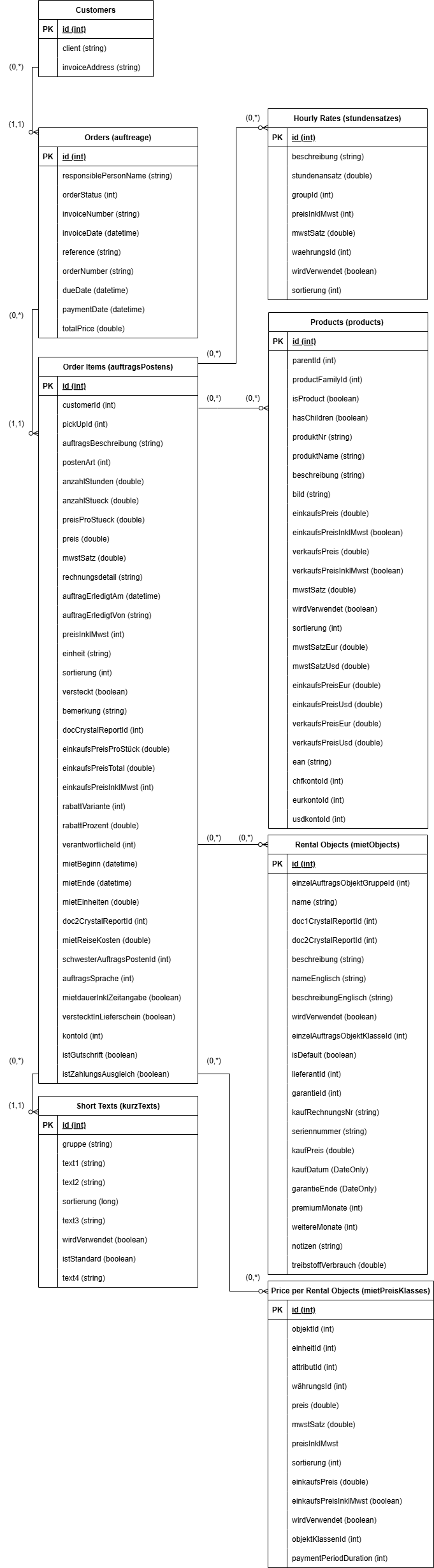
Each customer object represents a single customer.
A customer can have 0 to many (0. . .n) orders ("auftreage").
An order can have 0 to many (0. . .n) orter items ("auftragsPostens").
An order item can have 0 to many (0. . .n):
- Hourly Rates ("stundensatzes")
- Products ("products")
- Rental Objects ("mietObjects")
- Price per Rental Objects ("mietPreisKlasses")
- Short Texts ("kurzTexts")
The attributes map to the following text fields (see screenshot):
Layout B:
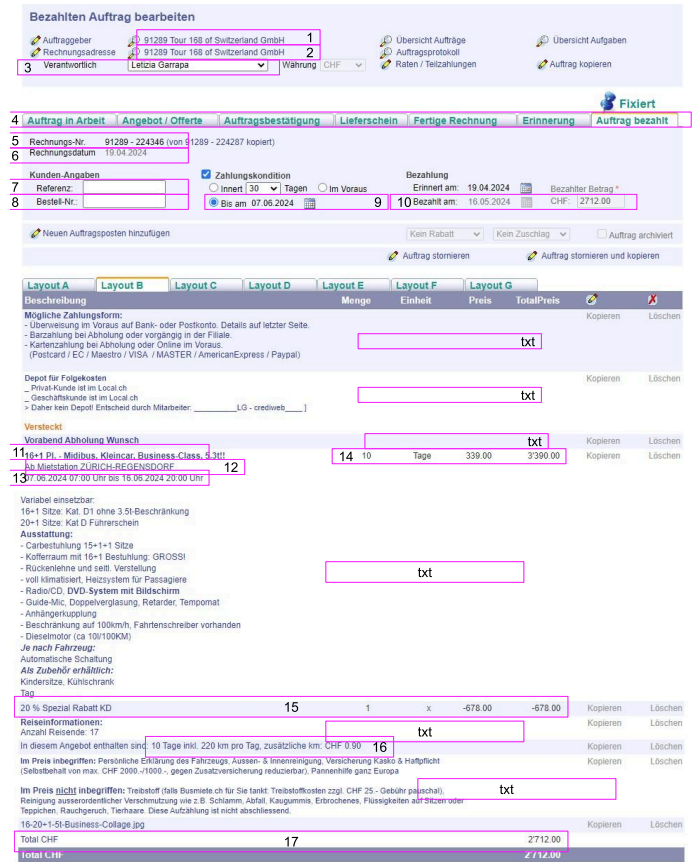
1 = "client"
2 = "invoiceAddress"
3 = "auftreage"."responsiblePersonName"
4 = "auftreage"."orderStatus"
5 = "auftreage"."invoiceNumber"
6 = "auftreage"."invoiceDate"
7 = "auftreage"."reference"
8 = "auftreage"."orderNumber"
9 = "auftreage"."dueDate"
10 = "auftreage"."paymentDate"
11 = "auftreage"."auftragsPostens"."mietObjekts"."name"
12 = "auftreage"."auftragsPostens"."auftragsBeschreibung" (hidden in loose text)
13 = "auftreage"."auftragsPostens"."auftragsBeschreibung"
14 =
15 =
16 = "auftreage"."auftragsPostens"."auftragsBeschreibung"
- 16 (without 14) = "auftreage"."auftragsPostens"."auftragsBeschreibung" (All)
14 =
Menge: "auftreage"."auftragsPostens"."anzahlStueck"
EInheit: "auftreage"."auftragsPostens"."mietPreisKlasses"."text"
Preis: "auftreage"."auftragsPostens"."mietPreisKlasses"."preis"
TotalPreis: "auftreage"."auftragsPostens"."preis"
17 = "auftreage"."totalPrice"
Between the different layouts only number 14 changes.
Layout A
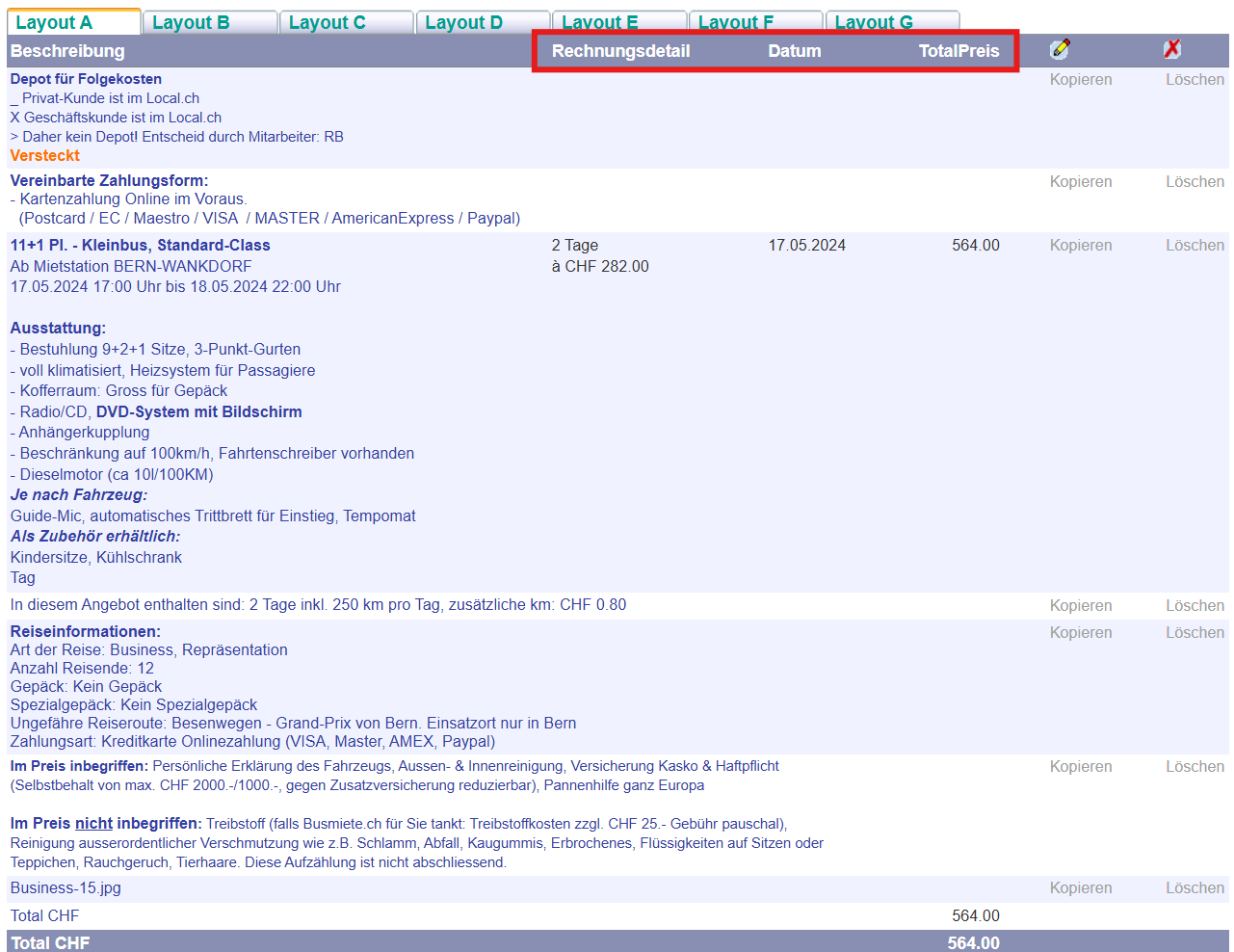
14 =
Rechnungsdetail: "auftreage"."auftragsPostens"."rechnungsdetail"
Datum: "auftreage"."auftragsPostens"."mietBeginn"
TotalPreis: "auftreage"."auftragsPostens"."preis"
Layout C
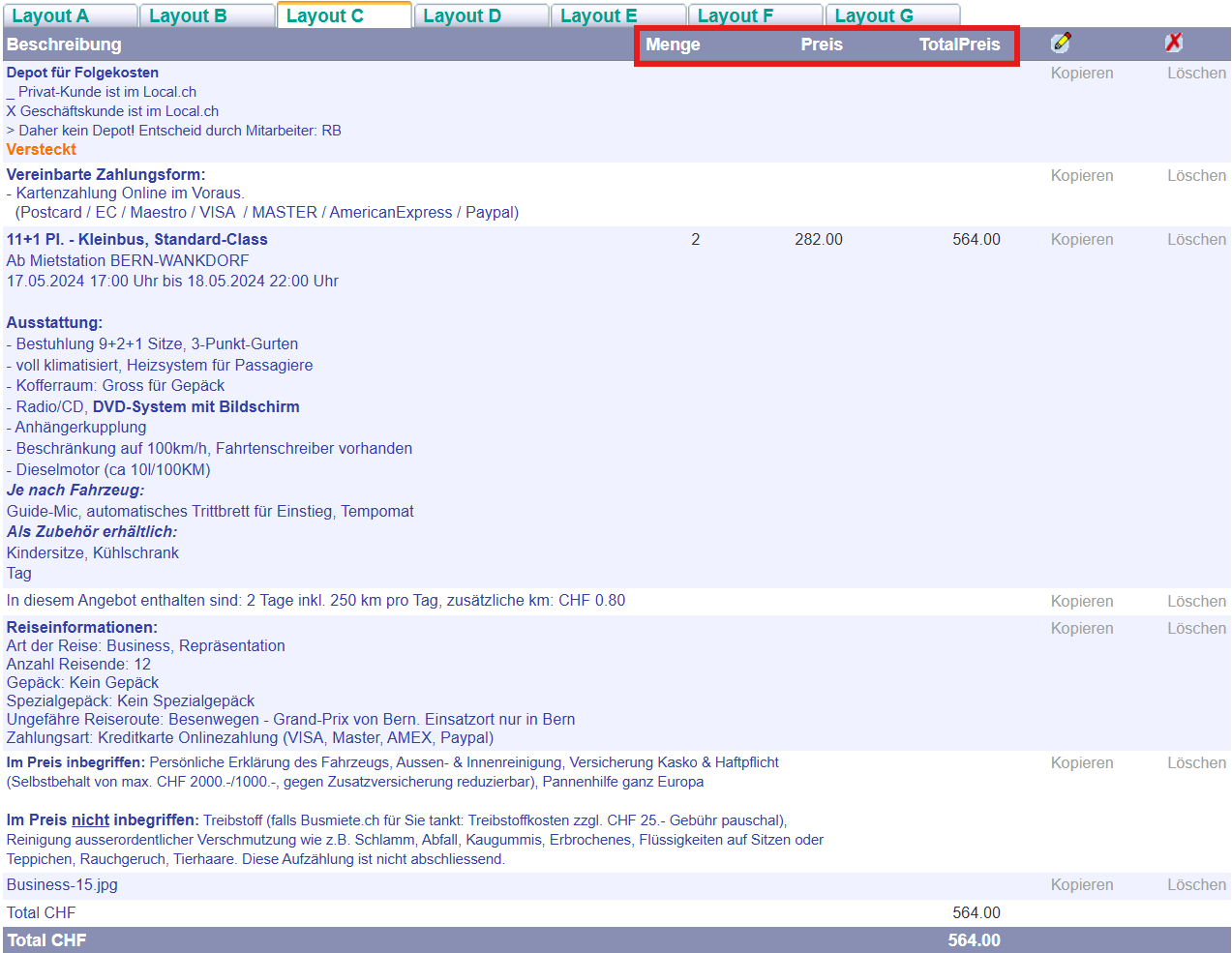
14 =
Menge: "auftreage"."auftragsPostens"."anzahlStueck"
Preis: "auftreage"."auftragsPostens"."mietPreisKlasses"."preis"
TotalPreis: "auftreage"."auftragsPostens"."preis"
Layout D
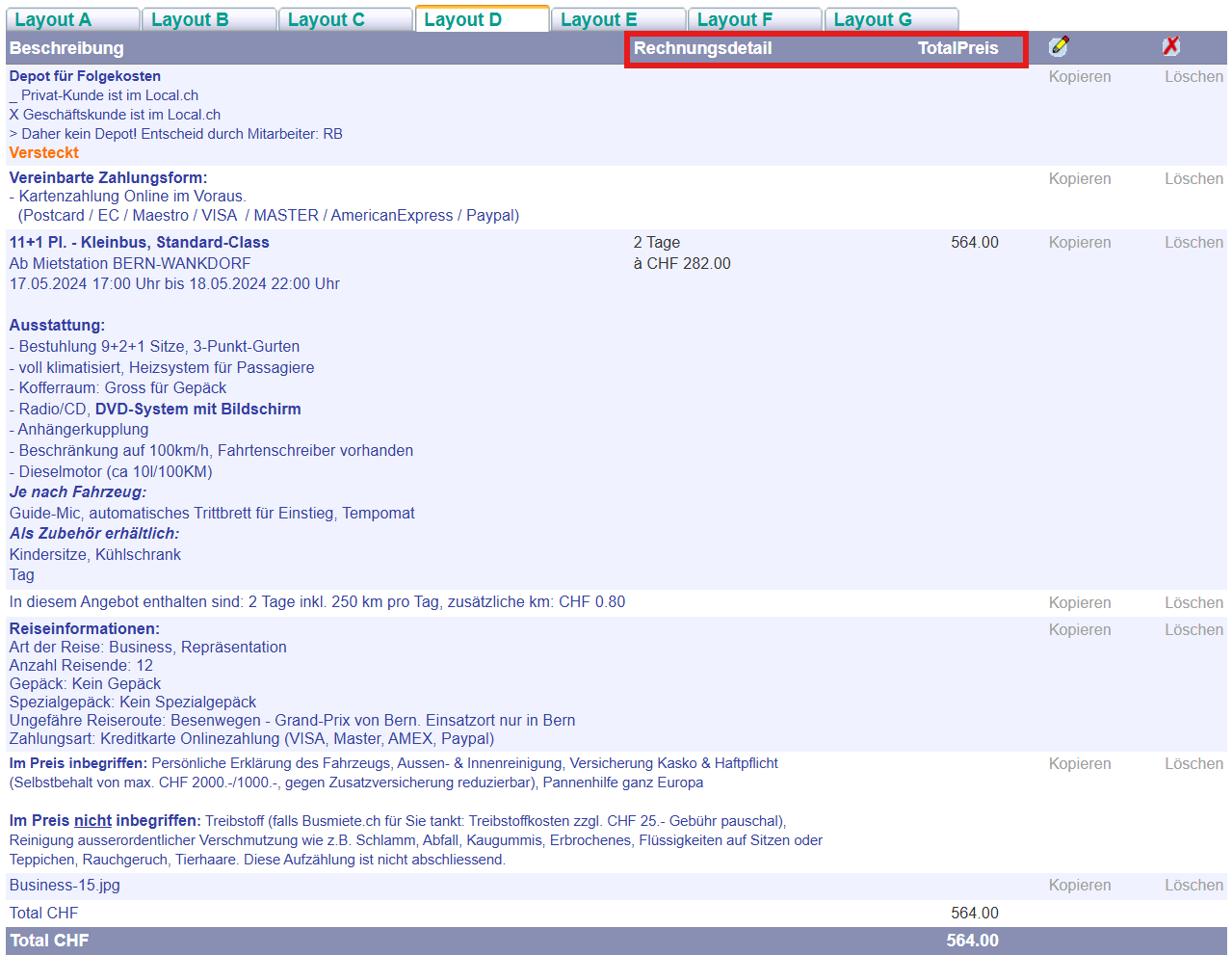
14 =
Rechnungsdetail: "auftreage"."auftragsPostens"."rechnungsdetail"
TotalPreis: "auftreage"."auftragsPostens"."preis"
Layout E
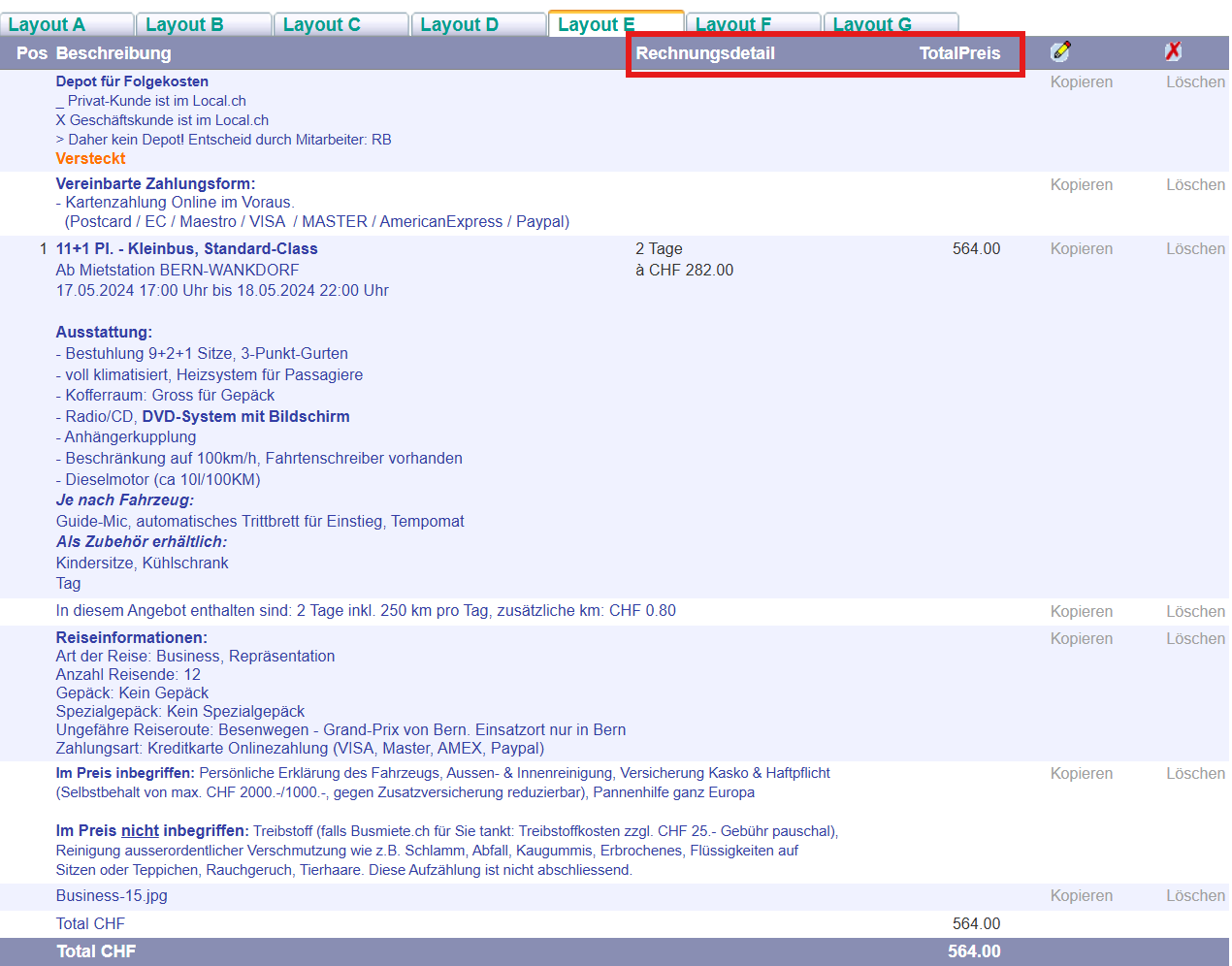
14 =
Rechnungsdetail: "auftreage"."auftragsPostens"."rechnungsdetail"
TotalPreis: "auftreage"."auftragsPostens"."preis"
Layout F
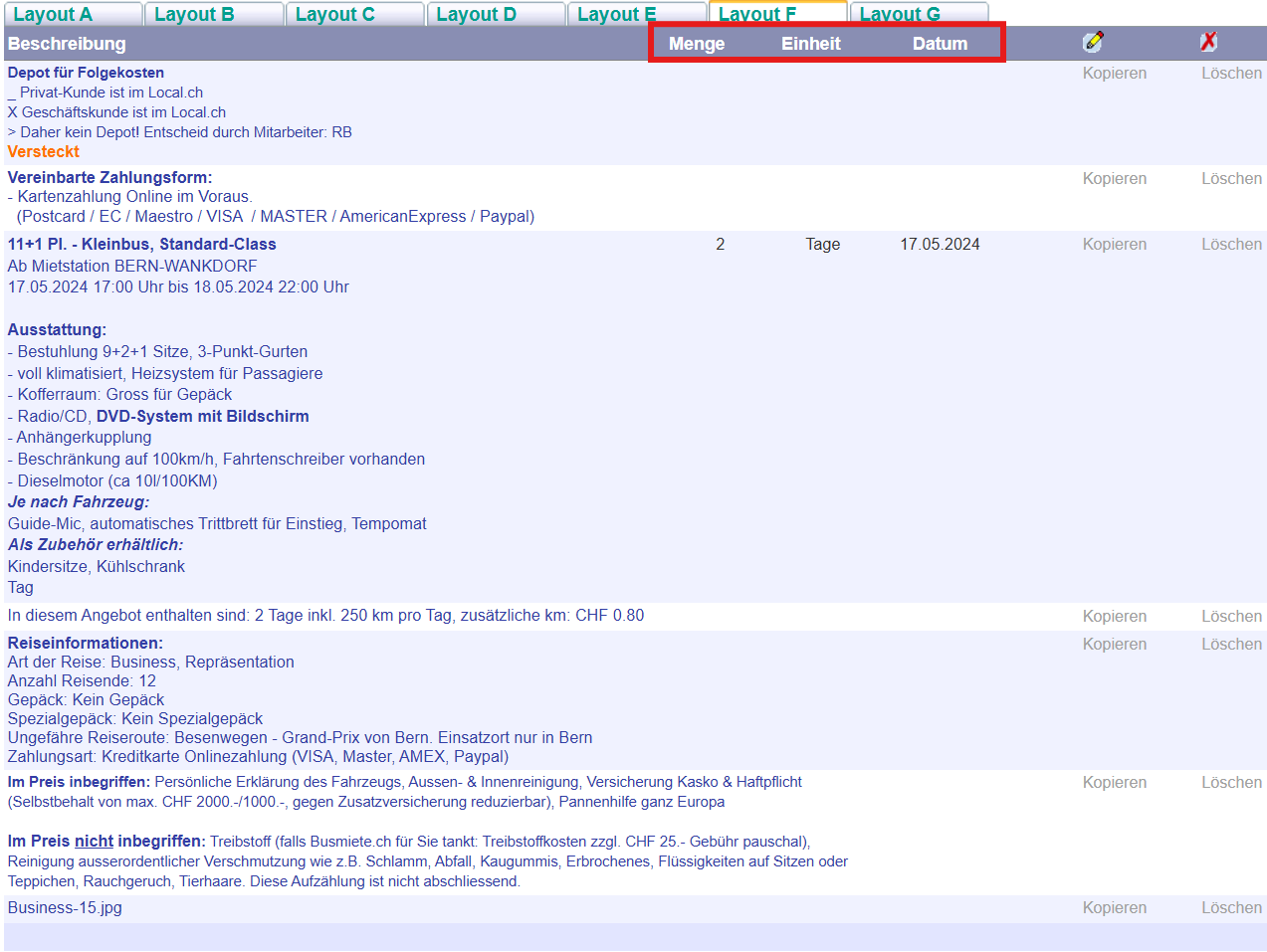
14 =
Menge: "auftreage"."auftragsPostens"."anzahlStueck"
EInheit: "auftreage"."auftragsPostens"."mietPreisKlasses"."text"
Datum: "auftreage"."auftragsPostens"."mietBeginn"
Layout G
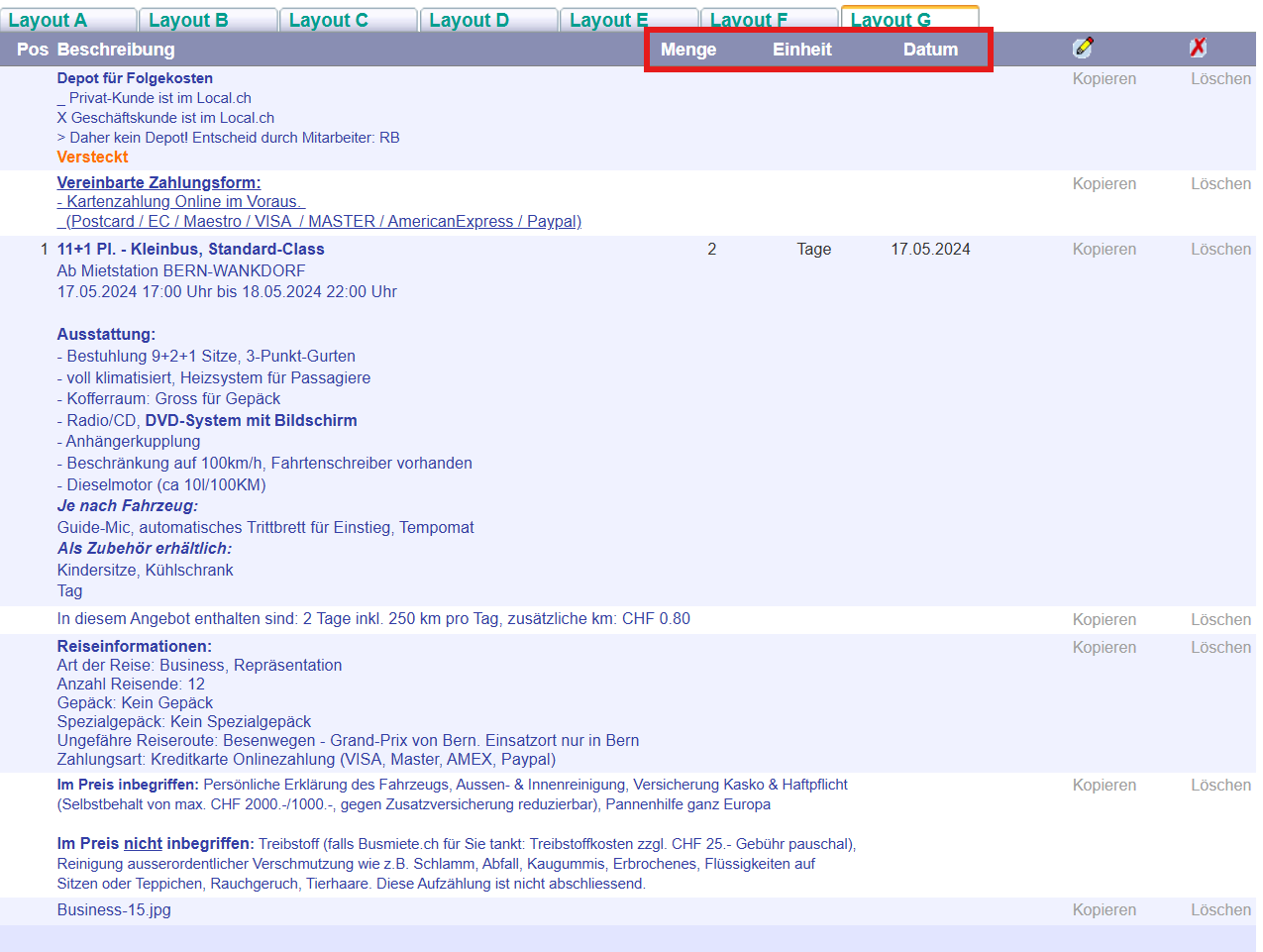
14 =
Menge: "auftreage"."auftragsPostens"."anzahlStueck"
EInheit: "auftreage"."auftragsPostens"."mietPreisKlasses"."text"
Datum: "auftreage"."auftragsPostens"."mietBeginn"